
Move an application to another cluster
If you redeploy somewhere else, copy the data by hand and change the address, every step can lose writes or traffic, and none of it can be undone once you are halfway.
In Flui, a move is one operation. Flui builds the new copy beside the old one, keeps it in step, and swaps the two only when you say so, or as soon as the copy is ready if you asked for that. Until the swap, nothing on the source has changed and you can cancel the whole move.
Three kinds of move
There are three commands because each kind of move carries different risks.
| You want to move | Command | What crosses |
|---|---|---|
| An application | flui migrate app | The running copy, its volumes, and its address |
| A Flui-managed PostgreSQL database | flui migrate db | The data |
| An application and the database it reads | flui migrate full | Both, in one cutover |
migrate app moves the application and the files it
keeps. The application keeps its name and address, and
its volumes are copied to the new cluster. At cutover its
address is repointed there. A database it reads is not
included: use migrate db for that, or migrate full for
both.
migrate db moves only the data. The destination
database comes up with its own new address, name, user and
password, and the source is left read-only so nothing
writes to it by accident. It does not change what your
application connects to. migrate full does that for you.
The shape of every move
Every move has four steps, and only the last two are permanent.
- Create. The destination is built and kept in step with the source. The source keeps serving.
- Cut over. Traffic, writes, or both move to the
destination.
--cutover autodoes this as soon as the destination is ready.--cutover manualpauses and waits for you. - Abort. Available at any point before the cutover completes. The destination is removed and the source is left untouched.
- Destroy the source. Optional, and only after the move has completed. It gives the old cluster its capacity back, and cannot be undone.
Steps 2 and 4 are separate so you can check the result first. After a completed move the old copy stays in place, drained. It still uses capacity, and you can inspect it until you destroy it.
What can move, and what cannot
Flui refuses a move it cannot finish when you ask for it, not halfway through. The refusal says which rule you hit. One exception: a full move checks the last two rules below only when its application starts to move, after the database has been copied.
An application can move when:
- it runs somewhere other than the target cluster;
- it does not read values out of another application’s secrets (move the applications it depends on first);
- it answers at a real domain. An application still on the fallback address built from its cluster’s IP cannot move, because that address belongs to the old cluster. Assign a DNS zone first: see Put an application on the internet;
- if it has volumes, there is a backup destination for
them to travel through: the one protecting the
application, your only one, or the one you name with
--backup-destination. See Protect and restore.
Only one migration can run at a time for each application.
migrate full has one more rule. Flui has to see, in the
application’s own configuration, that it points at the
database you named: either the standard PGHOST setting
matching the source database, or a postgres:// URL that
matches it. An application that reads its connection from
a linked secret cannot be rewired, so the move is refused
instead of guessed at.
Start the move
# an application, with its volumesflui migrate app create my-api --to production-eu
# a managed databaseflui migrate db create orders-db --to production-eu
# both togetherflui migrate full create my-api --db orders-db --to production-eu
--to (-t) is required and takes a cluster name or id.
--from (-f) names the source cluster. You can leave it
off when the profile has only one cluster; name it when
there are more. You can give the application by name or
by id.
--cutover auto is the default on all three. Pass
--cutover manual to pause the move and start the cutover
yourself.
flui migrate db has four more flags:
| Flag | What it does |
|---|---|
--mode live|restore | live streams from the running database, then cuts over. restore rebuilds from its backups instead, for when the source is already gone. Default live. |
--at <ISO-8601> | Restore mode only: the point in time to recover to. |
--name | A display name for the new database. Defaults to the old one’s slug with -migrated on the end. |
--no-verify | Skips the per-table row-count comparison Flui makes at cutover. The check is on by default, and a mismatch stops the cutover. |
flui migrate full has --staging, which decides how the
new copy of the application waits:
scaled-down(the default): the copy is built but not started until cutover. This is safe, and the write pause at cutover is a little longer.live-fenced: the copy is started at full size against the destination database while that database is still read-only, so it is already warm at the swap. This shortens the pause, but your application has to meet two conditions. It must start and pass its health check without writing anything, and it must not run background work with effects outside the database (queue consumers, scheduled jobs, outgoing mail or webhooks) until cutover. Flui holds back only its database writes.
Go to Management → Migrations. New migration opens one form for all three kinds.
Pick the type first (App, Database or Full app), then the source and target clusters. The application and database pickers fill from the source cluster once it is chosen, so pick the source first. The form refuses a target that is the same as the source.
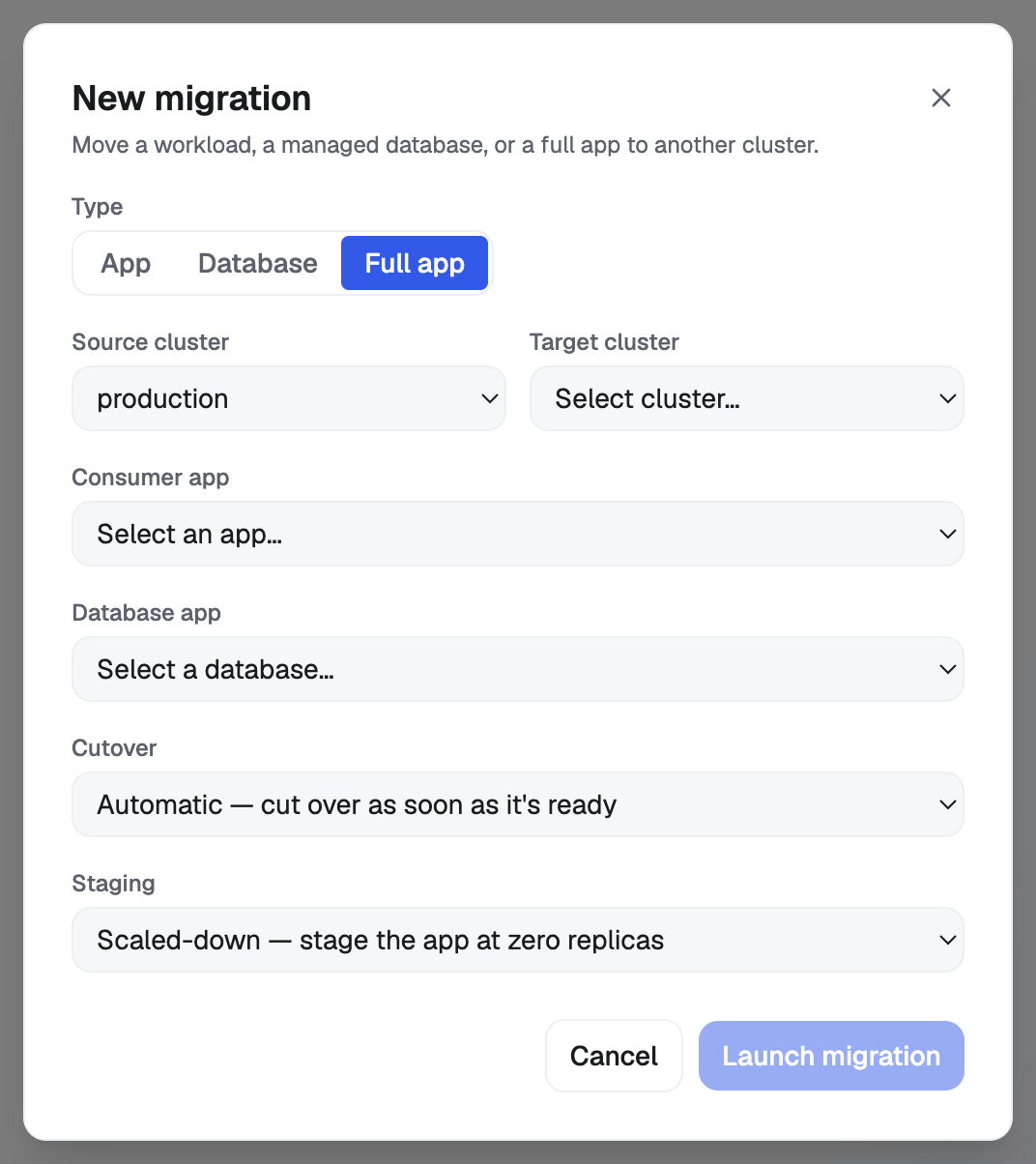
The rest of the form depends on the type. Cutover
(automatic or manual) is always there. A database move
adds the mode and the new database’s name, plus the
recovery time once the mode is Restore. A full move
adds the staging choice, with the warning about what
live-fenced requires of your application next to it. The
row-count check stays on; you can turn it off from the CLI
or an agent.
There is one tool per kind:
migrate_app: takessrcAppId,targetClusterIdand an optionalcutover.migrate_db: the same, plusmode,displayName,recoveryTargetTimeandverifyRowCounts.migrate_full: takesappId,dbAppId,targetClusterId, and optionalcutoverandstaging.
Application ids come from app_list (a managed database
is an application of kind DATABASE), and cluster ids from
cluster_list.
All three are in the Run migrations permission group.
The work is not finished when the call returns. Each call returns a migration id and an operation id. Nothing polls for the agent, and an agent should not report a move as done based on the create call.
Starting a database move or a full move stops and asks you. Both are part of the action cycle: when the caller is an agent, the call does not run. It returns a request id and a sentence you answer in the dashboard. The sentence names the database or application, the cluster, and whether the move will also finish by itself. An automatic cutover is stated explicitly, because approving it approves the whole move.
Starting an application-only move is the exception. It is not part of the action cycle and runs when the agent asks. Every later step (cutting over, aborting, destroying the source) does stop and ask.
Watch it
A move takes time. These are the states it goes through:
pending, thenprovisioning: the destination is being built. A full move showsdb_replicatingand thenapp_staginginstead.replicating: a database move is streaming. A database restored from backups goes throughrestoringinstead, straight tocompleted.ready(an application or a full move) orsynced(a database): the paused state. Underautothe move passes straight through it. Undermanualit waits here for you.cutover, thencompleted.failed, oraborted.
A full move has one more state, failed_forward: it
failed after the database was promoted, which is the one
point that is never rolled back. You can recover by
running the cutover again.
flui migrate app listflui migrate db show <migration-id>flui migrate full list --jsonEach of the three kinds has its own list and show.
list prints the id, the state, the target cluster and
the cutover mode. show adds what is moving and where
(for an application, the route between clusters) and the
error, if there was one. Both take --json.
The Migrations table shows the type, state, source and target, cutover mode and time of each move, plus the actions still available on each row. Those actions are the quickest way to tell where a move is.
migration_list takes an optional type (app, db or
full). Without it, all three kinds come back grouped.
migration_get takes type and id and returns one
migration’s state, cutover mode and error.
Both are in the See migrations permission group, which changes nothing.
Cut over
With --cutover auto there is nothing to do here. The
move cuts over as soon as the destination is ready.
With manual, the move waits at ready (or synced for
a database) until you start the cutover, so you choose
when it happens.
What the cutover does depends on the kind:
- An application is repointed at the destination cluster and its address follows it. It keeps its name and identity throughout. If it has volumes, it stops while the last changes to its files are copied, then starts on the destination. The move tells you this when you start it, and records how long the pause lasted. If the copy fails, the application starts again on its original cluster.
- A database stops taking writes, has its row counts checked table by table against the copy unless you turned that off, and the copy is promoted. From then on the source is read-only and stays that way.
- A full move does both together, and rewrites the application’s connection settings to the new database in the same step.
flui migrate app cutover <migration-id>flui migrate db cutover <migration-id>flui migrate full cutover <migration-id>Use the command that matches the kind of move. You cannot drive the parts of a full move on their own. Flui refuses and tells you to drive the full move instead.
A Cutover button appears on the row once the move is
paused, and only then. It runs as soon as you press it. To
run a cutover again after failed_forward, use the CLI or
an agent.
Use migration_cutover, with type and id. It is in
the Run migrations group, and it stops and asks you
first.
Driving one part of a full move directly is refused, and the agent is told to drive the full move.
Abort a move
An abort removes what was built on the destination and leaves the source as it was. Nothing has moved yet, so there is nothing to move back.
You can abort from pending up to the paused state, and
also from failed, so a broken move can be cleaned up.
The dashboard offers abort up to the paused state. To
abort a failed move, use the CLI (flui migrate app abort,
and the same for db and full) or an agent.
Abort is no longer available once the swap has happened. For a full move the limit comes earlier: once the database has been promoted, abort is refused. After that point there is no consistent old state to return to, so you finish the cutover instead. The refusal tells you so.
When you abort a database move, Flui drops the replication link but leaves the half-built destination database in place for you to inspect. You have to remove it yourself.
Destroy the source
After a move completes, the old copy is still there, drained. It receives no traffic, but it still uses the old cluster’s capacity.
destroy-source frees that capacity. It works only on a
completed move, it touches only the copy on the source
cluster, and it cannot be undone.
A database move has no destroy step. The source database is left read-only, not removed. To remove it, remove it as an application, which also deletes its storage. See Remove an application and its data.
flui migrate app destroy-source <migration-id>flui migrate full destroy-source <migration-id>Both ask you to confirm. --yes (-y) skips the
question; use it only in scripts.
A Destroy source button appears on completed application and full migrations, and it asks for confirmation before it runs.
Use migration_destroy_source, with type and id.
Asking for db is refused with an explanation, so the
call never silently does nothing.
This tool and migration_abort are in Abort and tear
down migrations, the highest of the three migration
permission groups. A key with only Run migrations can
start and finish a move, but cannot cancel it or destroy
the source.
Both tools can also be missing from the agent’s tool list. Removing things needs two independent conditions: the key must carry that permission depth, and the installation must have destructive operations switched on. If the tool is missing, that is the reason; nothing is broken.
Both stop and ask you before they run.
What an agent may do with this
There are three permission groups, from lowest to highest:
| Group | What it reaches |
|---|---|
| See migrations | migration_list, migration_get. Changes nothing. |
| Run migrations | The above, plus migrate_app, migrate_db, migrate_full and migration_cutover, and reading the applications and clusters involved. |
| Abort and tear down migrations | The above, plus migration_abort and migration_destroy_source. |
A group is granted or refused as a whole, so what you agreed to is exactly what the key carries. Choose what your agent may do explains how to choose one.
Every step that changes something on the destination or removes something on the source stops and asks a person. You approve it in the dashboard, and the agent finds out by trying again. When your agent stops to ask you explains why it works that way.
Where to go next
- Add a cluster and give it capacity: the cluster you are moving to has to exist first.
- Put an application on the internet: the DNS zone an application needs before it can move.
- Remove an application and its data: what removing the source database deletes.